
Case Study on New Features of Tasty App

Background
The availability of recipe and cooking apps has increased, allowing users with dietary restrictions to find recipes suitable for them. However, generic apps made for the general public lack specialized diets for specific audiences, making it harder for users with involuntary diet restrictions. Specific diets like low FODMAP or lactose intolerant users may struggle to find recipes suitable for their needs. The aim is to provide better filtering and transparency regarding food content, enabling users to avoid specific ingredients or food groups to discover recipes they can use. Recommended alternatives to better tailor the recipes to the user’s preferences could also be introduced. With the rising costs and health cases, people who need specialized diets could use more tools to make recipe decisions and nutrient decisions easier for themselves. The redesign of a feature, such as improving specificity and customization of cooking recipe apps, can help people with limited or restricted diets to find better-suited recipes to keep energy and costs low while maintaining a high level of nutrition, ultimately increasing morale for users.
Research Methods
The aim of the study is to collect background information and discover the challenges people encounter with their respective diet sensitivity. A mixed-method approach will be used to collect data, including user interviews, direct observation of users using their preferred app, and background research on types of apps already present in the market. The target audience is people with restricted or specific diets, which come across a wide age range. The team has good access to this target audience, and they are confident in finding more target audiences within their classmates if necessary.
Research Finding
Consolidated research findings
The study conducted 7 interviews with people diverse in age and dietary restrictions, aiming to focus on people with involuntary diet restrictions. All interviewees cooked at least three times a week, and nearly half of them always use recipes to guide cooking. All users used some type of app to help find recipes that aligned with their dietary needs, but only 1 out of 7 users used a specialized app meant for tracking a specific diet. A key concern found throughout the users was the need for a feature that focused more on specificity. Users expressed frustration in finding minute traces or undetectable amounts of an allergen or irritant in recipes or foods. Users also found great value in testimonials and ratings when it came to recipes, indicating the importance of feedback and the approval of like-minded peers. Users expressed a desire for better filtering, or an app dedicated solely to their dietary restrictions. Overall, the study provides valuable insight that there is a need for an app solely dedicated to involuntarily restricted diets.
Problem Statement
People with involuntary restricted diets need tools that can allow them to have total control and trust in order to cook suitable recipes that won’t cause them harm, due to current recipe apps tending to lack full customization, flexibility, or community.
Personas


Competitive Audit
Key:
Green rhombus: user intention
Red oval: user action
Blue rectangle: visible page

Flow 1
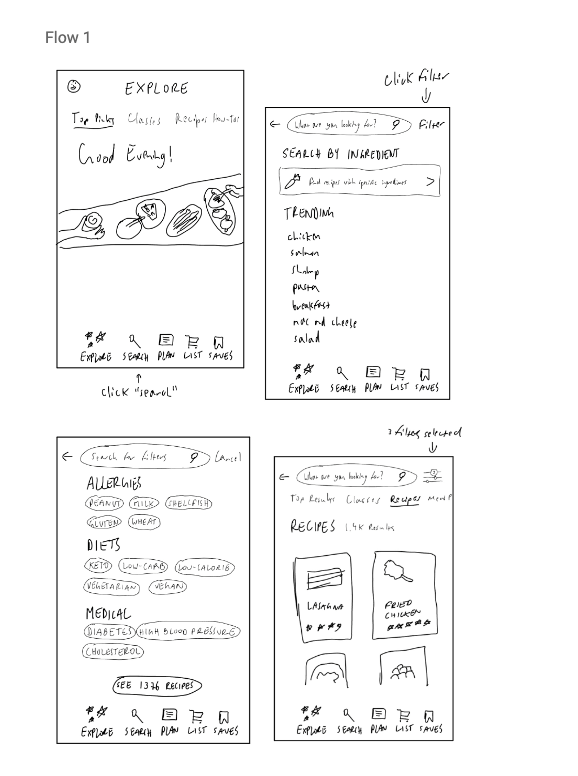
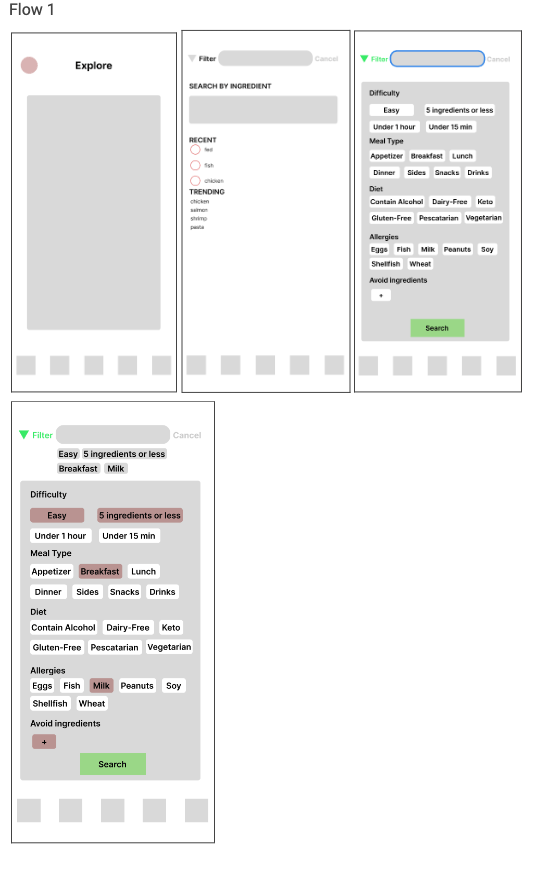
The Food Network application allows users to preset or filter their diets and allergies to avoid searching for recipes that may contain ingredients they cannot eat. However, the application is not intuitive, and users cannot search based on different filters. The first UX flow proposed is a feature where users can filter their search based on different criteria, making the search even clearer with filters. The entry point of this flow is at the searching page, where users have a new option of search, which they search by filters they apply. This UX flow would benefit Personas 1 & 2, who need a quick and easy way to determine if a recipe is safe for them to eat or to make meals quickly without sacrificing too much time and energy. The filter AFTER the search is not intuitive enough for users to use, and having filters before the search would make the search more efficient.
Flow 2

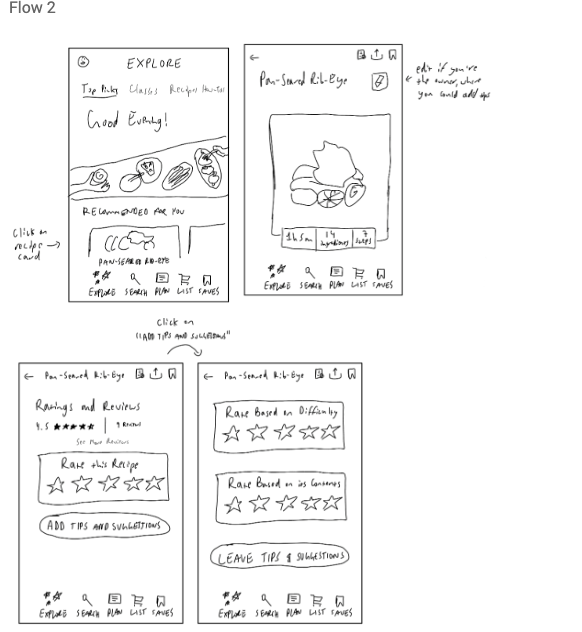
The proposed UX flow is inspired by the app “Tasty,” allowing users to provide tips and tricks for other users. The entry point of this UX flow is at the recipe card, where users can choose which action they want to take, such as viewing or adding tips and suggestions. This flow provides a solution to the problem statement by providing a more accurate rating of the difficulties and allowing users to have more autonomy over the recipes. This flow is not specifically designed for any personas but would increase their user experience.
Flow 3

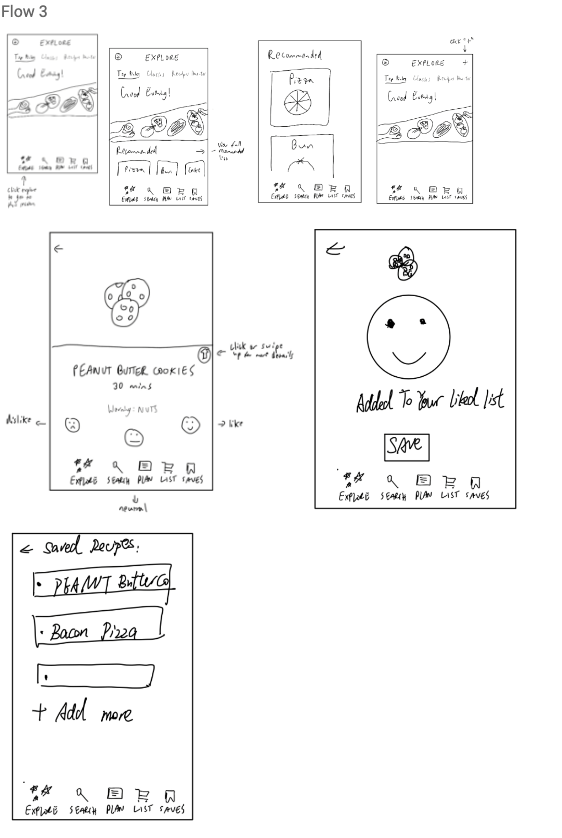
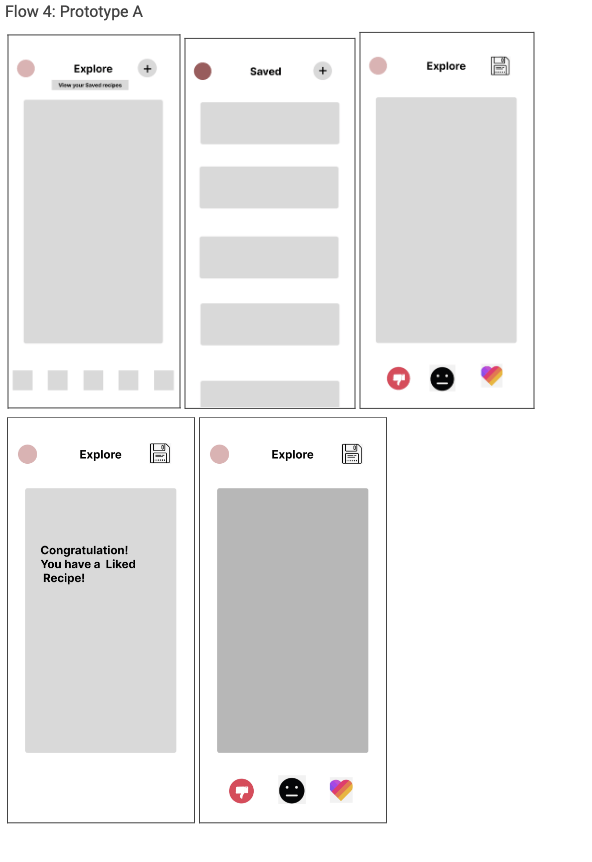
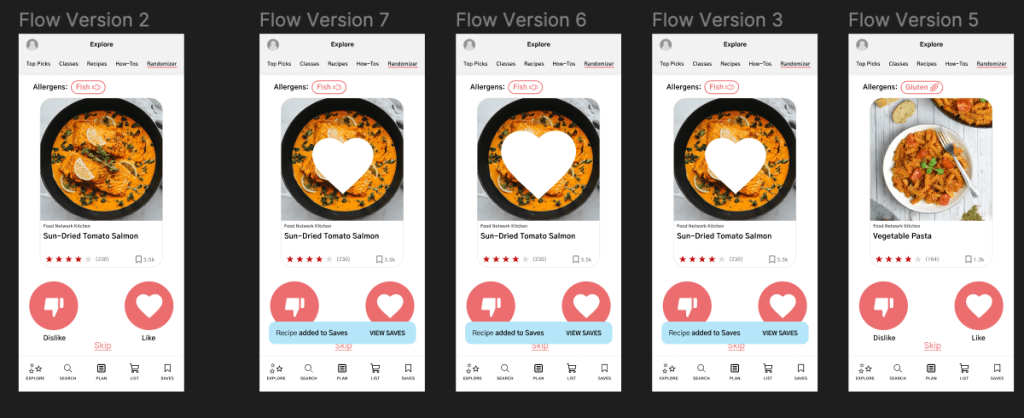
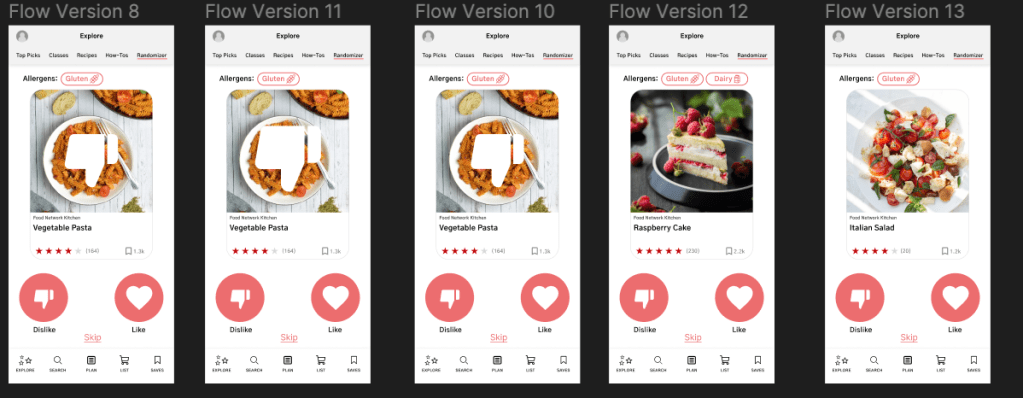
The proposed UX flow offers a personalized recipe recommendation system based on the preferences of Personas 2 and 3. The system provides suggestions based on the user’s favorite or saved recipes. The user can indicate their preference by swiping right to add the recipe to their favorites or left to dislike it. The system will then affect future recommendations by either suggesting more similar recipes for liked recipes or removing similar recipes for disliked ones. The user can also easily access their saved recipes from the explore page. The flow is designed to improve the user experience for personas 2 and 3 who want a good recommendation system that could filter out what they dislike.
Flow 4

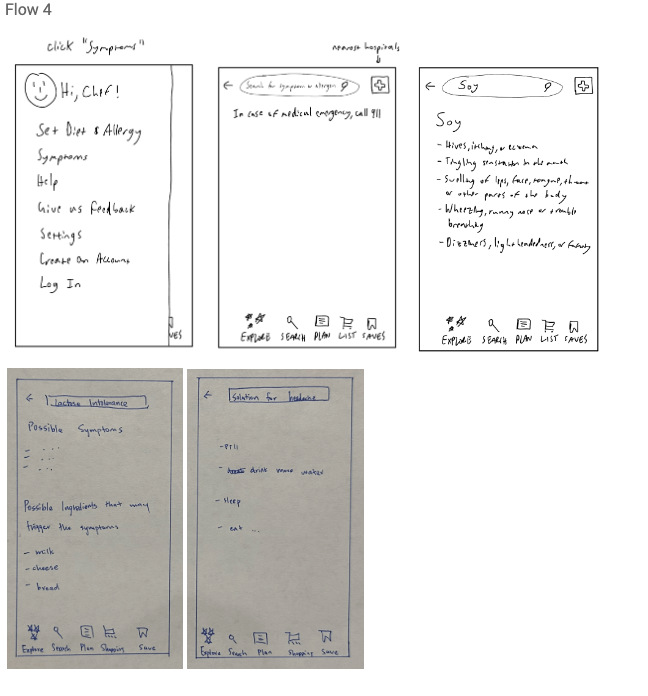
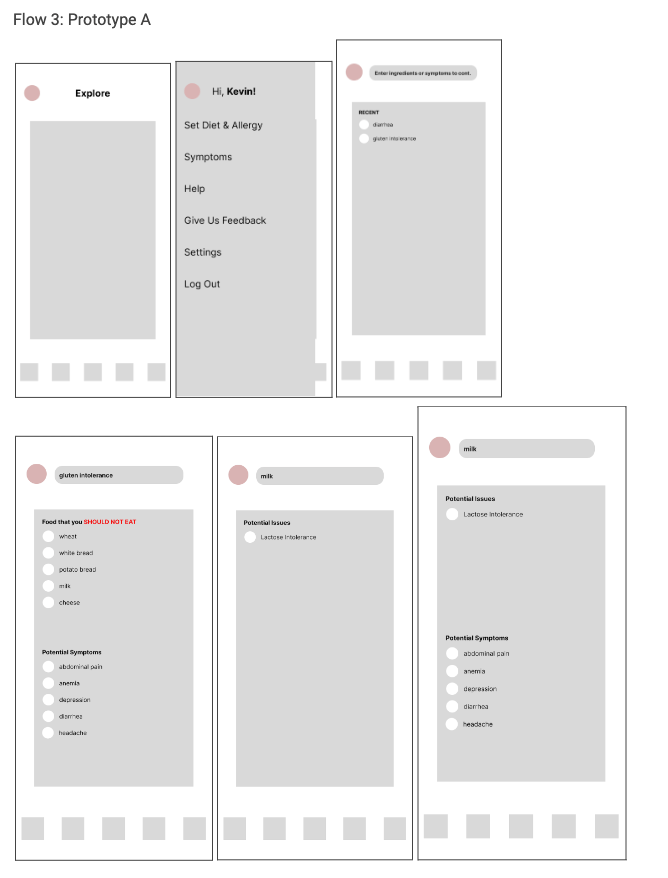
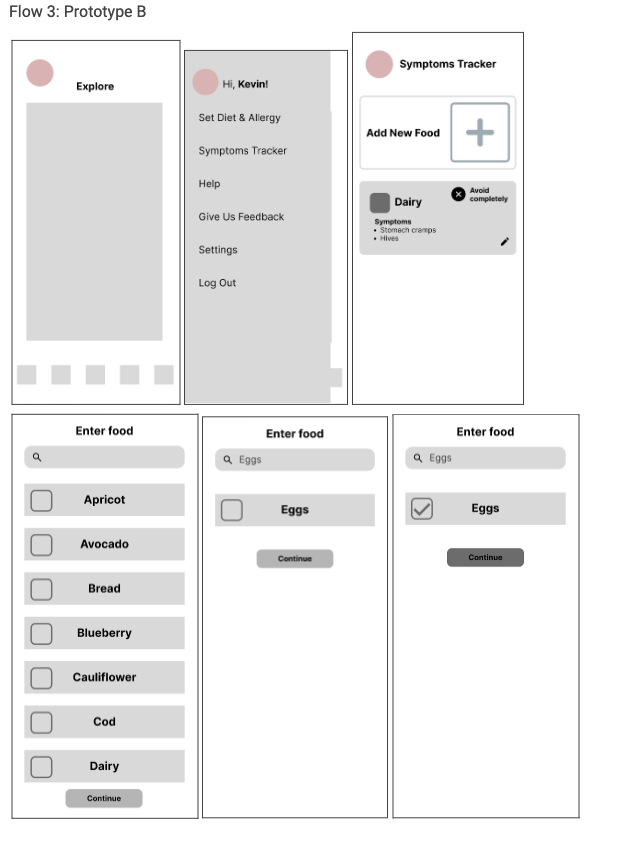
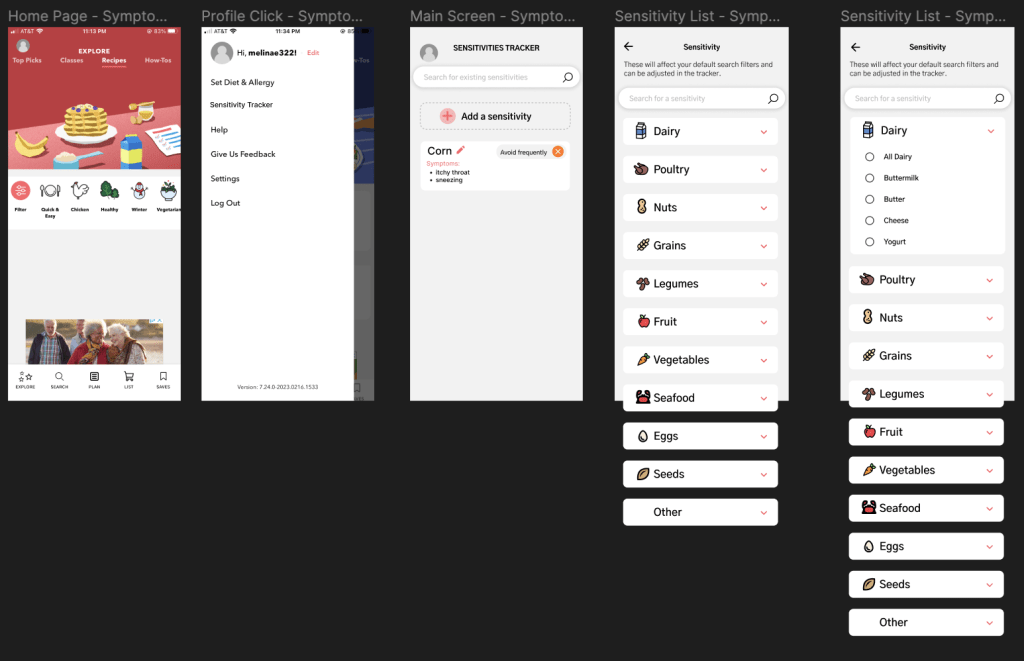
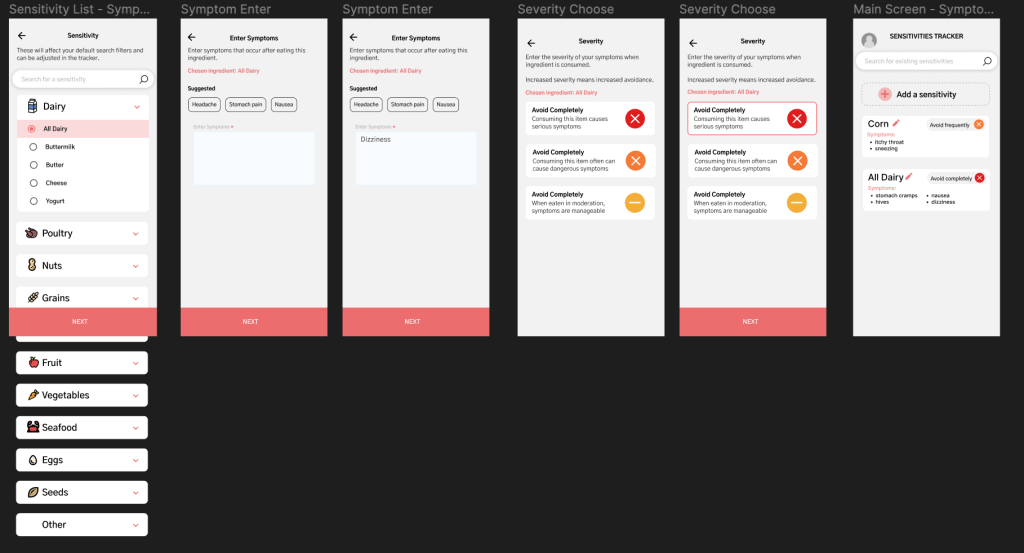
The proposed UX flow 4 is focused on adding a feature that helps users discover suspected trigger foods and symptoms based on the idea from persona 3 that the user would like to know the correlation between symptom and food intake. The user can access this feature by clicking on the user profile on the home page and selecting the “Symptom list” section. A list of suspected trigger foods and symptoms is displayed, and the user can select a specific food or symptom to learn more about it. Detailed information about the relationship between the food and the symptom is displayed, helping users identify potential triggers for their symptoms and make informed choices about their diets. This feature will provide users with valuable information about their own bodies, and it is designed to improve the user experience for persona 3.
UI Sketch
low-fidelity prototype designs

User Testing
Flow 1: The user-testing results showed that the filtering options in the app were overwhelming and cluttered. Users suggested incorporating drop-down menus for each section to avoid clutter and overwhelming the user. Additionally, allowing users to add their own diets, allergens, or ingredient avoidances could increase personalization, but may not be possible due to filtering capabilities. The team also received feedback on the filtering screen being overwhelming and suggested adding a drop-down menu for options. They also suggested adding filtering recipes by specific ratings such as overall, difficulty rating, and risk given dietary restrictions. The team will take these suggestions into account and make improvements to the app’s filtering feature.
Flow 3A:
In summary, users found difficulties in using the symptom and trigger feature, with some users finding it unintuitive and not useful. Some users preferred to search for this information online rather than using the app, while others suggested adding more personalization options and presetting dietary restrictions to make filtering easier. Despite this feedback, the team decided to stick with prototype B as the main interface. Some users also suggested adding a feature where the app recommends recipes based on symptoms or problems, which would be based on the user’s previous recipes.
Flow 3B
Prototype B received a more favorable reception from users compared to Prototype A. The users appreciated the search bar and the personalization offered by this prototype. However, some users found the number of options overwhelming, and suggested adding preset symptoms as a frame of reference. To improve the feature, the team plans to incorporate drop-downs to reduce cognitive load, add categories per food group, and provide suggestions for symptoms. Additionally, they are considering changing the focus to dietary restrictions rather than just allergies and renaming the feature accordingly. With this change, the app could filter recommended recipes based on specific dietary restrictions.
Flow 4A
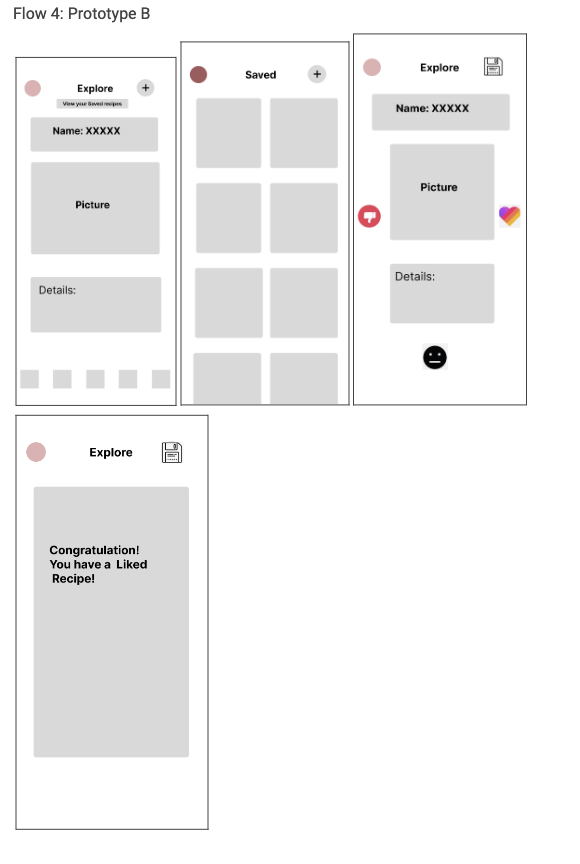
Users had some issues with the layout and intuitiveness of the saving process for recipes, with many not understanding what the save icons were for. Some users also questioned the need for a neutral option for recipes, suggesting it could be replaced with a skip option instead. Additionally, users suggested changes to the layout, including moving the save feature to a more intuitive location, shortening the “view your saved recipes” text, and making the like feature automatically save a recipe instead of requiring a separate click.
Flow 4B
Based on the user-testing results for Prototype B, it seems that some of the critiques from Prototype A carried over. Users favored the increased space for recipe details, but had issues with the icon placement for liking/disliking/neutral options. Additionally, users felt that the explore page was cluttered and could benefit from a more streamlined layout. Criticisms about the placement of the “+” button were also brought up again, and users suggested moving it to a different location on the page. Lastly, one user pointed out that the details of a specific recipe should not be shown immediately, as it may clutter the explore page and make it difficult to browse multiple recipes at once.
Final High-Fidelity Design
Like and Dislike Design
Symptom Design
Filter Design


 Chenhao's Portfolio